Showing posts with label Tech Talk. Show all posts

Wednesday, January 24, 2007

Speaking of eating...

I have been forced to eat my words. I have been working with screen display software in worship for about 6 or 7 years. I started with Microsoft PowerPoint. My first venture into software that has been created for worship services was with Media Shout v2.5. I loved it. Still do. Compare it to PowerPoint, it's night and day. It was my first venture into the world of dual screen (one screen is a control screen, the other is the projector). I could work with the show and all of the cues while running a video clip on the screen or showing song slides. I could fire a song, scripture, graphic, text, or video clip at anytime without having it in my cue list.

Then came Media Shout v3.0. These poor developers were being nagged so badly by multimedia directors that they released a product that really wasn't ready for release. Jittery video, S l o w transitions, and crashes were reported from the beginning. Yet I stood by the product because, frankly, it's hard to teach an old dog new tricks.

Everybody I talked to thought I was crazy for not using this new EasyWorship. They claimed it was "user-friendly," which to me translated to "limited functionality." I refused to even try to mess with the program because I was so convinced I had the superior product. Don't get me wrong, Media Shout still has some advantages over EasyWorship, such as the ability to make text slides on the fly (you could literally make sermon notes and fire them as it was being preached).

Here recently, as I have begun to take on the role of Worship Elder in my church, I wanted my first task to be getting our presentation system in order. It had been upstairs in a room with a window overlooking the sanctuary with the television production equipment. At the time it was set up, this was a great idea. Now that we are putting everything that has to do with the worship service under one department, having the presentation computer, lighting guy, and sound guy together makes more sense. With this arrangement everything is much better timed and the guy running the slides isn't as easily distracted as he would be by being in another room.

So, Micah, our soundman, and a fellow geek, had a nice rack-mount server he wanted to give to this new setup. It's not a toy, mind you. This is a dual-processor Intel Xeon 2.8 ghz hyperthreading machine with almost a terabyte (that's 1,000 GB) of hard drive space, a 256MB ATI graphics card, and 1GB of ram running a fresh install of Windows XP Professional. (all Tim Allen fans are grunting).

I installed Media Shout 3.0 on it, and it jittered the live video feed as it overlayed the songs. I installed EasyWorship, enabled it's DirectX plugin, and BAMO - it worked like a charm. In fact, don't tell anyone, but, I'm starting to actually LIKE it!

The one thing it does that I love the most is the Logo button. The logo button doesn't just bring up a logo. It COVERS whats selected to be on screen. I can change stuff, cue up videos, or do anything else I'd like and it's completely hidden from the congregation by the logo. It's really nice. As I mentioned before, through a nice analog-firewire converter box, It handles firewire video feeds NICELY.

There are still some things I don't like about it, and maybe someone who knows the software more than me can help me around these things:
  1. I can't create text slides on the fly, and I have to rely on PowerPoint a LOT to import such things.
  2. I do a lot of graphics in Photoshop, and it doesn't use PSD files - meaning I have to convert them to JPEGs.
  3. Not only this, but I have to import the picture using the images thingy, then I have to tell the program to add it to the selection of backgrounds. I can't simply select ANY picture from the hard drive and use it immediately as a background. (I actually HATE that)
If you're looking for a presentation system, or have some questions about this technology, get in touch with me. My contact information is on my Plaxo card link in my sidebar.

Wednesday, November 15, 2006

I've been transformed!


As you can tell (if you've been here before), I've got a new template and design for my blog. But the transformation isn't just skin deep. This goes all the way down to how the blog is served to you, the reader. I'm now blogging in "Beta." This is Blogger's new system, and at first - I hated it. Reason- I had to change my template. I liked my old template. But the problem was, it wasn't XML compliant. So out with the old, in with the new.

The rewards for switching to the new Beta service are now becoming oh so clear! The new Widget setup is really nice. It will make blogging so much easier for those who don't want to know about HTML. For those of us who are more technically gifted, it makes the experience even more fun. I can customize widgets to do whatever I need (so far). All of my sidebar items are separate widgets. I can edit them at any time without screwing up the rest of my blog.

Another nice feature that has been added is the label function. As you can see to your right, I have labels that you can click on, and every post related to those particular labels are brought together. All I have to do is assign a label when posting, and it's done.

The feature I already love the most is the additional feeds. There are RSS Feeds for each post's comments, feeds for all comments, and of course you still have post feeds. (see my post on RSS for more info about the feed service). To subscribe to my new feeds, be sure to click the appropriate link in my sidebar. Your browser (if rss equipped - again see the RSS post) will place a live bookmark for the feed in your toolbar.

Check out the new Blogger Beta at beta.blogger.com .

Wednesday, November 1, 2006

Broke Geek Needs Broke Computers

Hey everybody. I'm looking to make a little extra cash over the next few weeks. The only way I know how to make extra money (legally) is to fix computers. Windows or Mac - I can fix virtually any problem on any of them (just don't ask about those extra screws laying around afterwards).

Do you need a computer fixed? Leave me a comment with your email address. Format your email like this: joeblowATyourisp DOTcom. This way you don't get bot-spammed by posting your email. We'll then get together and talk about all of the particulars. Here's an incentive if you don't have a computer to fix: If you send someone my way, after they pay me to repair their computer, a drink of your choice at Dad's Place is my treat.

So, if you know someone who's computer is spyware-loaded, their hard drive has crashed with important data on it, their network needs configured so they can share files and printers, they need a hardware upgrade of some kind, or anything else related to these wonderful devices - get them in touch with me, and be sure they tell me who sent them!

Monday, October 30, 2006

HEMI's back on patrol?

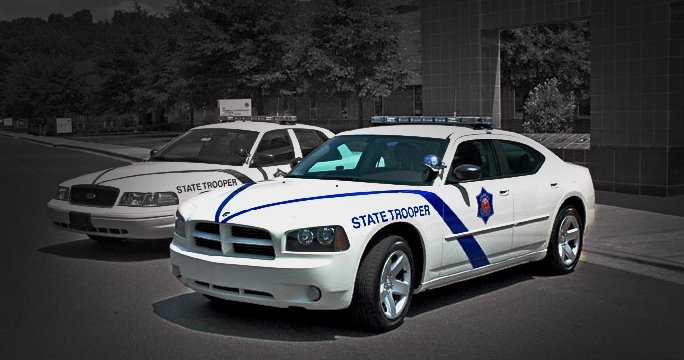
Melissa, the trip's and I were on our way to Little Rock for "Boo at the Zoo" yesterday when something caught my eye on I-530 between Pine Bluff and Little Rock. I thought to myself, "that's a white car driving really fast coming from the other way, but it's not shaped like a police car." But I couldn't have been more mistaken! What was driving south at a high rate of speed, obviously about to scare the heebie-jeebies out of some unsuspecting motorist who passively saw the make and model of the car thinking the same thing I thought was the newest weapon in the Arkansas State Police's fleet!

Here's the now identified - unidentified flying object (he was moving pretty quick):
The Arkansas State Police website has a news article about this new beast of a cruiser.

Almost makes me want to mash the gas pedal just so I can get a chance to ask:
"Officer, does that thing got a HEMI in it?"

Monday, October 23, 2006

RSS Feeds - A beautiful, uniting thing

Okay, I know I posted last night something that may cause a mild tension headache as you read it.

But I have to mention something I just decided to jump into. First of all, please don't adopt the "geekier than thou" attitude as you read this if you are already using RSS services. For the rest of you, you may have seen the little icon for RSS feeds on websites, blogs, etc. RSS is a feed service that allows you to subscribe to it and see articles more efficiently. Bloglines uses this format to recieve its updates. Until today, I had been trying Bloglines some. However, while at Dad's Place, I ran into Dean, who said that the new IE7 has the ability to add a blog's feed as a live bookmark eliminating the need for bloglines. "What a novel idea" so I thought to myself. Yet I'm trying to distance myself from the fanatical interpretations of Microsoft's browser and move to a more html-correct browser called Firefox (do you feel the fire!). Then I remembered, every time I go to a blog or some site that has an RSS feed, I see the little RSS icon in my address bar. So I went to Jeff's blog to try it out (didn't want to screw up my own blog, you know!). I clicked the little icon, and it gave me a choice of 3 feeds to subscribe to (atom, RSS 1.0 and RSS 2.0) - VOILA! I now have a button on Firefox's toolbar that I can click at anytime and call up the inspiration of the utterances of anyone's blog posts. It even lists out all of the recent posts where I can click on the one I want to read and possibly even carefully offer comment. Glorious!

Tuesday, October 17, 2006

Windows Vista vs OSX

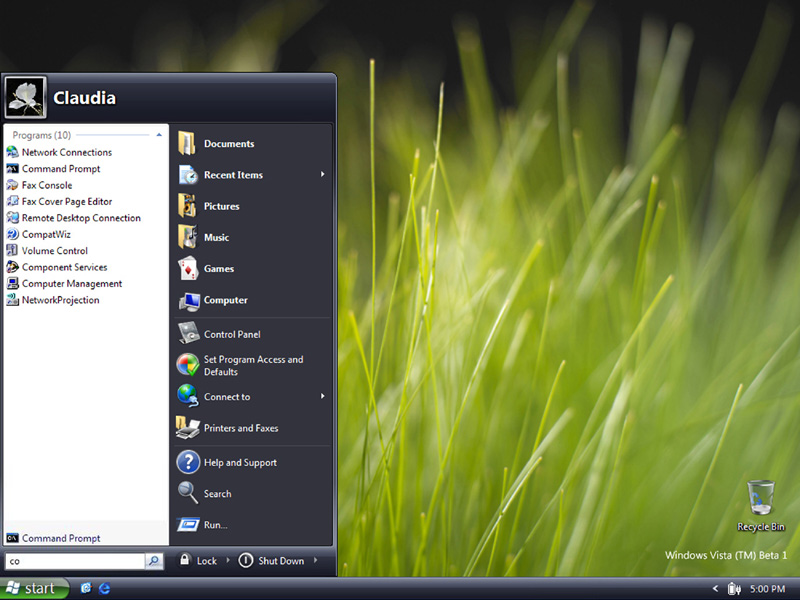
I recently had the opportunity to download the new Microsoft's newest operating system, Windows Vista Release Candidate 1 (RC1 for short). They claim it will be on shelves for home users and pre-loaded into new computers sometime around January. I installed it on my laptop's second partition so I wouldn't screw up my Windows XP SP2 installation (which is working better than ever, I might add). I'll have to say the graphics people at Microsoft did a pretty good job at making their new OS look better. They have made everything look like it's made of something shiny (hasn't OSX been "shiny" since its release, say around 2000?) . The screen fades from black to the pretty vista background, instead of flickering off/then on like in previous versions (Mac OSX has been doing this for years). There are some nice idiot-proofing that asks for your permission to run installers and executables that could damage your system (uh, mac's also been doing this for a while now). If you have a big enough graphics card, you can get the "aero" effects which give you translucent window frames, thumbnail previews of minimized windows, and 3-d animation of your destop items as you switch through them (mac's been doing most of this for a long time, and I've seen these functions being used on 500mhz G3 Macs with graphics adapters with as little as 8mb of ram). All of the control panel stuff is arranged for more user-friendliness (yup, you guessed it). The Start button, now there's something they've truely improved on. Instead of the endless menus that used to flash across the screen, they have everything open up in one column in the menu. Pretty nice.

Here's what I really think about Windows Vista:
Remember when Windows 98 Second Edition was out in full force (I'm going to completely ignore the stupidity of Windows ME)? They were loading it into machines as big as 1ghz with 128mb of ram, and it was working BEAUTIFULLY. The major trouble with 98 was the blue screens and the difficulty networking on a real network. Other than that, they were getting somewhere. Then came XP. Windows XP was supposed to eliminate the blue screens (and it did) and be as easy to network as Windows 2000 (and it is). But it took the last 4 years for Microsoft to get the major bugs worked out of XP and for computer technology to be fast enough and with enough ram to really see what it could do. If you ask me, Microsoft should have kept XP in beta until the release of Service Pack 2. I feel like all XP users were having to pay to be beta testers until then. When you beta-test a product, they warn you not to use it on critical computers and to consistently back up your data. Every Windows user had to have Windows XP if they were buying a new computer, even if the computer was an 800mhz p3 with only 128mb of ram (98SE would have been great on that machine). Now that computers are powerful enough and the operating system has secured itself better, Windows XP is now a usable operating system. So what is Microsoft to do? Roll out another operating system before technolgy is ready for it, and before it has been tested enough in a real world environment.

Enter the MAC:
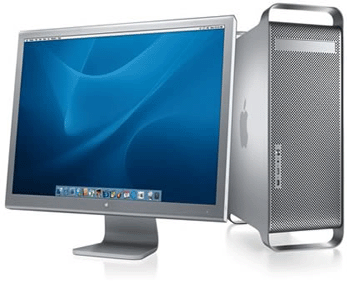
Last week, Glen Perkins, of Perkins Farm supply called me and said his hard drive was going dead on his Powerbook G4. So I had him order a new 7200 RPM 80gb drive and installed it for him. I've been "testing" his powerbook for the last few days while I have been waiting for an adapter so I can transfer his files from his old drive. This machine is light years ahead of a "PC". Everything from the hinges and latches to the guts are so much more refined than on any windows-based machine I've seen to date. It finishes booting in less than 45 seconds and it runs circles around my 1.5ghz sony vaio with 512mb of ram running Windows XP (and now Vista RC1). The kicker: It's about 4 years old, running an 867mhz processor and the latest version of OSX (tiger). The battery is the original, and it still lasts for 2 hours (they lasted about 5 new). This thing has built-in Airport supporting both wireless B&G; Bluetooth (connects to my razr nicely); firewire; usb 2.0; and probably more than I even know. The OS installation was also the easiest I've ever done with full GUI functionality through the entire process (no clunky command prompt stuff). I found out today, this thing is still worth between 650 and 800.00 (compared to my vaio being worth only about $400 if I'm lucky).

Here's the consequence for Microsoft:
Windows Vista is a resource hogging, oversized, rearranged version of the same old operating system. Just because of the way it has been rearranged, it's like learning how to use a whole new OS. To use it, most people are going to have to buy a high-end machine (for a somewhat useable desktop, spending around $1500). But isn't price of the hardware and the learning of a new OS some of the arguments that keep people from switching to a Mac (it has been my only two)? In my opinion, Microsoft has fumbled and has turned the game over to the other team (at least for me). If I have to spend money on a new computer, and learn a new OS it will be on a new Mac.

Friday, September 15, 2006

Okay, time to educate...


It's time to debunk some things about technology. For those of you who do not know me, I make an income by managing the local cable company's internet service. I'm tier 1, tier 2, and tier 3 tech support, Internet sales, network administrator, mail administrator, webmaster, and everything else that is involved with a cable ISP all in one person. The only thing I don't do is fix and install cable lines.

Every day, I get calls on my official cable internet office phone from people who have no clue about broadband technology. I answer the phone, they ask "do you offer DSL?" AAARRRRGGGHHH!!!!! (whew - I needed to do that). My answer - No, we're the cable company, we offer cable internet.

Unbeknownst to most people (thats a nice big word for some of you more educated blog people, or is it blukers - I'm still new to this), DSL isn't the blanket term for all high-speed internet service. There's FiOS (FIber Optic Service), DSL (Digital Subscriber Line), and Cable Internet just to name a few; and that's just naming some of the wireline based services.

DSL is offered by your telephone company. It's only available by a telephone line. It CANNOT be carried by Cable TV service. It transmits it's magic over copper phone lines in a frequency outside of the analog voice spectrum. It is my understanding that if you have DSL service, you have to have home telephone service. I don't work with the phone company, so I'm not too well versed on how the technology works, but I do know their service is only available up to 15000 feet from the telco's demarcation point (where their service is transmitted from). The further from the demarc point, the slower your service will run. They recieve their internet service to the demarc point through fiber, DS-3, or something simliar, and it's shared by some kind of router (not too sure what they use), and sent to the individual phone lines.

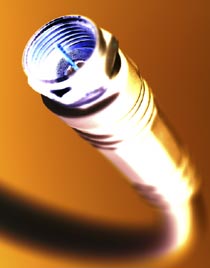
Cable Internet is good no matter how far from the cable office you live. The speeds remain the same whereever you are on the cable plant (everywhere cable feeds in your city). The service is fed into the cable company's office or headend (the place where the cable originates from) by fiber, DS-3, or some similar type feed (my cable company uses a 12mbps multi-link setup with about 8 t-1 lines). In our setup, the 8 t-1 lines go into a nice expensive router - then a 100mbps fast ethernet line goes into a switch to share that 12mbps service with our mail server, DNS server, and Broadband cable router (CMTS - short for Cable Modem Termination System). The CMTS has a RF network card that has about 7 connectors: 6 for upstream channels (what your cable modem transmits) and one for downstream (what your modem recieves). Those upstream channels are sent to individual parts of town (fiber nodes). The downstream line is broadcast all over town on one tv channel. Because of this type of configuration, many cable companies can provide internet service that far exceeds the speeds of DSL. My system could provide service up to 5mbps (or higher) if I had the bandwidth to the headend. Still yet, with 12mbps of service to the headend, I can still provide service on an average of 1mbps and up to a max of 2.5mbps to about 550 customers.

So, in summary, Cable Internet and DSL are NOT the same. They both have totally different technologies, and a totally different set of pros and cons. So when you call your local cable company looking for internet service, don't be asking for DSL. It's like going to Jeff Noble looking to buy a PC!

Thursday, August 24, 2006

Some Windows Help

Here's a little help for any one of you fellow Windows victims...
As the manager of a cable internet company, it still amazes me how many people out there have trouble with viruses and spyware. I know Jeff Noble is probably reading this saying Macs don't get viruses or spyware. Okay, I agree with you there, and when they start letting you install it on your own a super crazy machine that you built for $300, I'll have a Mac. Linux operating systems (Xandros, and Linspire are two great versions of Linux) are a great secure alternative, but there are still many things you can't run on a Linux box.

So if you're a Windows user, you need to read on... I have some tips for you that will save you a world of hurt!

1) Get a good anti-virus program. You can buy one at the store and pay an annual subscription for it, or you can do like I do: get AVG Free Edition. IT'S a FREE ANTIVIRUS program. It works great.

2) Install a router between your computer and cable or dsl modem. It uses a technology called "network address translation" also know as "NAT". When you plug your computer direct into a Cable or DSL modem, your computer gets a number from your Internet Service Provider (ISP) called an Internet Protocol (IP) address. Every computer on every network big and small has an IP address. It identifies your computer on the network. The IP address your ISP assigns to your computer is called a public IP address. This means that any computer can "see" your computer and possibly hack into its resources. This is the biggest cause for virus/worm infection on a broadband connection. Computers get infected and infect other computers, or the virus turns the computer into a mail zombie and sends spam all over the world. How do you stop this from happening? This where NAT works its magic. Simply put, the router gets the public IP address, then it serves as a gateway to your computer. Your computer gets a PRIVATE IP address that only those computers behind your router can connect to. The only data that gets to the computer from the Internet is the data that it "requests". The router "routes" the data from the internet to the computer that requested the data. If the data is from a virus-infected computer somewhere else, the router simply drops it.

3) Get the software updates from Microsoft. I know, they should have written the program right in the first place, but Windows is getting the short end of the stick on this subject. Think about how many more copies of Windows software (legal and illegal - ahem!) are out there than Mac or Linux. What makes the biggest target for a hacker/virus code designer? Of course it's Windows. If there were more Macs or more Linux systems than Windows, they would be the target, and would be the OS that Windows users would be snubbing their noses at saying my brand of compuer doesn't get viruses. So as the Microsoft developers update their software to provide the best security for your copy of Windows - download them and install them immediately! If your copy of Windows XP is not a legal copy (you know who you are), you can still get updates through the automatic update service already on your machine. If it is legal, you can do automatic updating OR you can go to Windows Updateany time to check for updates.

4) This is a biggie: stay off of porn sites, hacker sites, and free software sites that offer software that you should be paying for. And by all means stay off of file sharing programs (examples: Kazaa, Bearshare, Ares, Gnutella) YOU WILL GET A VIRUS OR SPYWARE PROGRAM ON YOUR WINDOWS MACHINE if you go there. Here's an example. I lost the serial number for some software we legitimately had here at the office. So I went online and google searched serial for x (x meaning the name of the software). I turned off Internet Explorer's "show pictures" option in the advanced settings so I wouldn't be accidently subject to nasty pictures, clicked on a link that seemed to have what I was looking for, and downloaded a "keygen" for the software. I ran the keygen and didn't get a keygen. I got a nasty virus that destroyed about 100GB (yes that's GIGABYTES) of video data. Not only did it destroy the data, but it made the 200GB drive that held the data unreadable AND unusable. It was a $105.00 mistake (what it cost to replace the drive) that could have only cost $50 by purchasing the software again legitimately.

5) Don't use Internet Exploder - I mean Explorer. Use Mozilla Firefox. Firefox isn't intergrated into the operating sytem, thus spyware cannot be loaded directly into your system by simply going to a web page. Internet Explorer is doing better at this since XP Service pack 2 and now the new IE7, but I still don't fully trust it. Microsoft needs to find a way to seperate the browser from the operating system a little better. I'll trust it when I can completely uninstall Internet Explorer from my system without crashing Windows. Maybe the new Windows Vista will have this remedied. Watch these videos, they sum up the difference between IE and Firefox:


If this all sounds like too much trouble, and you have the cash to shell out for a Mac, by all means - check out Jeff Noble. Here's a link to his blog. It's my understanding he sells new and pre-owned systems(I'm not kidding - you actually can buy CERTIFIED PRE-OWNED MACS).

If you have computer tips you'd like to share, email me at tj.computergeek@gmail.com.

Welcome!

HELLO EVERYBODY... I've now moved my blog to Wordpress.com . You'll need to change your bookmarks to point to http://tjscott.wordpress.com (for now!). I like the Wordpress format and way of doing things. It gives me more versatility. SEE YOU THERE!